• This is default featured slide 1 title

    Go to Blogger edit html and find these sentences.Now replace these sentences with your own descriptions.This theme is Bloggerized by NewBloggerThemes.com.

  • This is default featured slide 2 title

    Go to Blogger edit html and find these sentences.Now replace these sentences with your own descriptions.This theme is Bloggerized by NewBloggerThemes.com.

  • This is default featured slide 3 title

    Go to Blogger edit html and find these sentences.Now replace these sentences with your own descriptions.This theme is Bloggerized by NewBloggerThemes.com.

  • This is default featured slide 4 title

    Go to Blogger edit html and find these sentences.Now replace these sentences with your own descriptions.This theme is Bloggerized by NewBloggerThemes.com.

  • This is default featured slide 5 title

    Go to Blogger edit html and find these sentences.Now replace these sentences with your own descriptions.This theme is Bloggerized by NewBloggerThemes.com.

Showing posts with label Linux. Show all posts

LinuxGUIDE - Quick announcement


Here's a quick announcement for LinuxGUIDE

Ever since we launched our LinuxGUIDE a YouTube channel which publish Linux related stuff with Bosnian address, we have decided that from now one we gonna cover all latest Linux courses available online, top 10 things to do and share our Linux experience with our followers. We have also decided that from now one we gonna publish a Linux tutorials, how to guides, top 10 things, roadmap to Linux LPIC-1 on the website. Once on website the same content will be published in video format on Linux GUIDE channel each Friday starting from 1. January 2018.

Till than we wish you Marry Christmas and Happy New Year !!!
_________________

This article was last time edited on Thursday 28. December 2017 | 17 : 52 

Share:

VIDEO: How to convert RPM package to DEB?


As many of you know, I'm on my second month, 6-th week of my NDG Linux Essential course which is preparation for taking LCPI -1 exam for Linux System Administrator. Couple weeks ago I have launched my very own YouTube channel /Amar Tufo/ where I published my videos from Ubuntu Linux tutorials and other areas of my interests. Therefore I have made couple days ago this amazing tutorial on 'How to convert .RPM package into DEBIAN using Alien?'. It's a very short video that explain what alien is and how to use it. I shall note that this tutorial is not intended for Linux beginners as to fact that it assumed that you have some experience in Linux, that you are well familiar with Linux terminology as well as using Terminal. Before you watch my video, let us explain shortly what is Alien, how can you find out about Alien via Linux and so on.

Written by: Amar Tufo
18. June, 2017

1. It's GNU/alien and not an Alien!


Don't you worry, there are no Aliens inside Linux. It's a tool designed to convert an .RPM package into fully flash .DEBIAN installation package that you can later install via Terminal or by GNOME software. But, if you are not certain about alien as a tool, there's one guy that you can ask and it's a man alien. Once you typed man alien in your Terminal, the following page will appear and it will look like this:


Figure 1: Entry man page for alien
Image source: local /home/amar

Without further delay, here's the official video of this short tutorial which I made proudly using Kdenlive open source video editor. 


Video: How to convert .RPM package into .DEB using Alien

That's it. Make sure to watch this video and hopefully you will learn something from it. Please subscribe to my YouTube channel, like it, share it, and comment bellow the video. I see you next time.
Share:

NDG Linux Essential course - week 5 -


Welcome to my NDG Linux Essential course week 5offcial report. It's been a while since I posted my four week report of my Linux education which is a preparation for taking LCPI - 1 (Linux System Administrator). As noted previously in my posts, NDG Linux Essential course is linked to my official category Linux Essential which is available at my website. It allows anyone to track my course progress as I went one. As you know, I have extended my education with my own Linux Lab's and Linux Exams to further my knowledge and to test my skills. 

Written by: Amar Tufo
25. May 2017

In the module 5 of my NDG Linux Essential course I have worked with getting help on Linux using the man command and it's argument. As you know, using man command you can find out in details arguments and option that goes with specific command such as man ls which will give you the following output.


Figure 1: Using man to find info about the certain command

I shall note that this is the one way you can get infos about each command you use in Linux Terminal. So if you're not sure about arguments that goes with command you use, than you know who you should contact, it's a man

There were also a PATH environment variables as well as which command that gives you exact path to specific command which will look like this. 


Figure 2: Using which command to find out the path of date

As you  probably know, the date command gives you current date, day and time and  such daemon is located in /bin/date folder.

One of the interesting part of this module was using the history command to print out previously used commands. History is very useful since it allows you to show a specific list of commands that have been previously used. It may be confusing but sometimes you have typed more than 100 commands and such list is to long to display but if you type $HISTSIZE = 25 it will print only 25 commands on your list. But, here's how history works in the following screen shoot.


Figure 3: Using history command in Terminal

You can also write a history shell variable named $HISTSIZE that will store exact number of your commands which looks like this.


Figure 4: Using history BASH shell variable $HISTSIZE

Entire module 5 was basically about providing help to the Linux user when using Terminal and so on. As far as my exam for module 5 which I have scored 10 and I'm really proud and happy on the fact that I'm getting better each time as I progress on my education. Here's my entire exam for module 5 that I have had.


Ok, this is my exam of module 5 for my NDG Linux education. Feel free to comment this article, take my exam to study it and use it as short Linux command reference. This is it for today and I see you soon in my module 6 of my Linux education. Till then best regards and have a nice weekend.

Share:

NDG Linux Essential course - week 4 -


Welcome to my NDG Linux Essential course week 4 official report. It's been a while since I posted my third week report of this course in which I'm enrolled and today was my first lab on module 4 of this course. If you wonder what was the lab about, well it was Command Line skills and some frequent commands used in BASH such as: which, echo $PATH, echo today is `date` a back quotes command as well as uname. Most interesting part of NDG Linux Essential course Module4 was certainly final exam for this part in which I scored the 8 grade.  Here's a quick screen shoot of my test as well as my grade.

Written by: Amar Tufo
28. April 2017


Figure 1: NDG Linux Essential course | Module 4 exam

You can also see entire exam for module 4 of my NDG Linux Essential course in this pdf file which I have make.

As you can see above my test, there is my name on top of it to prove that I'm enrolled and so that NDG Linux Essential instructor can grade my work. Basically this test consisted from 10 questions covering both Linux terminology as well and BASH commands. This my final score on this exam.


Figure 2: NDG Linux Essential course | Module 4 exam score

I can say that I'm very happy and motivated by my accomplished results and progress that I achieved so far. Module 4 has been successfully completed and soon I will start Module 5 of this course. Till then, have a nice weekend and wee see you soon.
Share:

NDG Linux Essential course - week 3 -


Welcome to my third week report on my NDG Linux Essential course. As I have promised early on my few posts, I have made a very good progress in my Linux adventure so far. I have completed four modules in my NDG Linux Essential course and also to further my knowledge made a couple Linux test my self covering Linux terminology, Networking, BASH scripting skills, Linux directory architecture and much more. As you shall see in a moment, these are practically qualified LCPI - 1 tests which do not differ from official tests compiled by Linux Institute.

Written by: Amar Tufo
18. april, 2017

 Test above consists from 30 questions covering basic Linux terminology, desktop environments, questions that required answers on the line such as: ' Which directory contains programs which are compiled and installed manually?' and so on. I'm really happy about these tests aside from official exams that I take at my NDG Linux Essential course, which requires exam completion in order to complete each module. As for my test, you may download it, study it and take it you're self and check your knowledge in Linux.

That's it for today.
We see you soon at 4-th week report.

About Author:

My name is Amar Tufo. I’m 24-years old graduate student of Archaeology, Faculty of Philosophy at Sarajevo. Experinced blogger, founder and CEO of this web site, author, web developer as well as proud Ubuntu Linux & Open Source software evangelist. Big dreamer and Trance music lover.


Let's Get Connected: facebook

Share:

Linux booting process in 6 steps


Have you ever wondered what happens when you turn on your Linux machine? What processes are happening inside your hard drive, your RAM, BIOS and etc. Well, you can stop searching for answer on line, because here's an article that will explain Linux Booting process in 6 steps. I should note that this article is a part of my NDG Linux Course program that I'm enrolled in, so you can read it on my website.

Written by: Amar Tufo.
16 April, 2017


 1. BIOS - 


 BIOS seraches, loads and executes the boot loader.

2. MBR (Master Boot Record) - it is located in the 1st sector of the bootable disk /dev/sda. MBR is less than 512 bytes in size and consists of three components:

- primary boot loader 446 bytes
- partition table info 64 bytes
- magic numbers 2 bytes

MBR loads and executes the GRUB boot loader


3. GRUB (GRand Unified Bootloader) - It is a Multiboot boot loader which displays a splash screen, waits a few seconds, if you don't enter anything, it loads the default kernel image as specified in the GRUB conf file /etc/grub.conf. It contains kernel and initrd image. In case you don't know what initrd image is? Initrd stands for InitialRAMdisk which is initial root file system that is mounted prior to when the real root file system is available. The initrd is bound to the kernel and loaded as a part of the kernel boot procedure.


4. Kernel - Once the control is given to the kernel which is the central part of any OS and which act as a mediator between hardware and software. Kernel once loaded into RAM stays there until the machine is shutdown. Once the kernel starts it's operation the first thing it will do is to execute the INIT process.


5. INIT (Initialization) - Looks at the /etc/inittab file to decide the Linux run level. There are 6 major Linux run level every time Linux boots:


- 0 halt
- 1 single halt mode
- 2 multiuser NO NFS
- 3 full multiuser mode
- 4 unused
- 5 x11
- 6 reboot

6. Run Level Program - When the Linux is booting up, you might see various services getting started, such as 'starting sendmail . . . . OK'. There are called the run level programs. Depending on your default init kernel setting, system is going to execute the programs from one of the following directories: run level 0 - /etc/rc.d/rc0.d/ .

This is the 6 booting steps of Linux. If you like this article, don't forget to share on the social networks, be sure to visit my official LinkedIn page to find out about my work and the things I wrote and do. If you are willing to know in details about processes that are happening during Linux boot than follow the links bellow.

> 6 Stages of Linux Boot Process (Startup Sequence)
Share:

My list of online resources and books for LCPI - 1


As you now I'm enrolled in NDG Linux Essential course which is preparation for takink LCPI - 1 (Linux Certified Professional). Therefore I have compiled a series of useful online resources and books which I used alongside this course as well as beside it to expand my further knowledge in Linux administration, Networking, CLI skills, BASH skills and more. So, without further delay, check out my list.

Written by: Amar Tufo
13, april 2017

1) Debian Administrator's Handbook - Debian Jessy from discovery to mastery | https://debian-handbook.info/


2) Pro Ubuntu Server Administration - Sender Van Gugt
© Apress 2009 |  https://doc.lagout.org/operating%20system%20/linux/Pro%20Ubuntu%20Server%20Administration.pdf


3) The Linux System Administration Guide 1993 - 2014 GNU Free Documentation License 1.2 |  http://www.tldp.org/LDP/sag/sag.pdf


 4) The Linux Network Administrators Guide - Group of authors             http://www.tldp.org/LDP/nag2/nag2.pdf


 5) The Linux Networking - Paul Cobbaut © CEST 2015                          http://linux-training.be/linuxnet.pdf


 6) Linux Network Administrator's Guide - 3-rd Edition © O'Reilly 2015 | ftp://217.147.231.57/Cours/Reseaux/Linux%20Network%20Administrators%20Guide%203rd%20Edition.pdf


 7) The Linux Admin Quick Reference - Command Chet Sheet               


8) Basic Linux Networking Commands You Should Know - It's F.O.S.S  https://itsfoss.com/basic-linux-networking-commands/


 9) Learning the BASH shell - 3-rd Edition, Cameron Newham © O'Reilly 2009  | http://bit.ly/2pdX4l0


10) BASH Reference Manual  © GNU Fuondation 2016


 11) 7 dmesg command for troubleshooting Linux system - TecMint 


Ok, this is it. I shall note that some of the links provided in my article might not work therefore I suggest you typing the name of provided book/or on-line resources in this list for quicker finding this you're self. I need to say that this list is not the only one as I shall compile my next one with much better resources and tutorials as well as exams for expanding knowledge in Linux. Till than, well see you soon. 

Share:

NetAcademy Linux Essential course - daily update -


It's been a while since I post about my Linux Essential course provided by Network Development Group and Cisco. Now I'm in second week of my Linux Education adventure and this is what I done so far. As you shall see in a moment, I have taken different approach to my course and you're gonna see in a moment what it is. 

Written by: Amar Tufo.

#Week Two - and I'm still progressing!


There we go, a good friend of all Linux geeks a CLI (Command Line Interface). I finally comes to point where this course gets really interesting in a sense that I' supposed to execute a certain command via Terminal in a BASH (Bourne Again Shell). To be honest, I prefer the dark side of Linux, a good old TTY. 


# When on course, write down your blog!


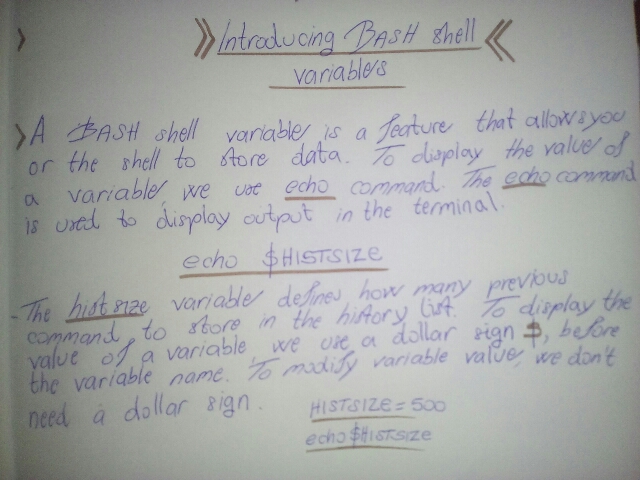
Here I have taken a screen shoot with my smart phone cam of my writings during this course. As you can see at the right upper corner of my page, there's a 'Linux Preparation LXO - 1' title and bellow it my respected name. Bellow the title of this course there is old logo of my web site. Basically I taken some notes on important commands that I'm working with such as ls to list the contents of directory; cd to navigate to certain directory; history command to list all the commands that have been previously used and etc.


In this screen shoot, you can see that I have reach a part of my course 'Indroducing BASH shell variables' where I have write some basic and important things to remember, such as variable HISTSIZE that can display how much command is going to be stored in it's memory. For example, I can say my HISTSIZE variable that it should store 1000 commands in it's memory and sintax to do that via Terminal is the following:

HISTSIZE = 1000
echo  $HISTSIZE

Once you type history command in Terminal, it will store 1000 commands in it's memory per one entry. For more about history, please see man history.
In this picture, you can see how far did I come on my NDG Linux Essential Course dashboard. The blue rectangle shows exactly which part did I reach and which parts were completed. But here's the interesting part of my Linux adventure, it's a self made test of Linux skills containing some 40 questions covering both system administration, network skills as well as commands. 


I need to note that this screen shoot of my test is compiled after my job interview with in the Crossvallia company in BiH, headquarters in Bosmal City Center, Sarajevo. They give me the same test to complete which was not different from my own test which I compiled one week later to boost my Linux skills, and eventually I got to NDG Linux Essential course which will do just that, make me a hell of Linux administrator.

What to say at the end?

Well, honestly I'm really inspired while doing my education on Linux and progressing trough this course. On things that inspires me more, that this entire course can be linked to your professional LinkedIn account where it can show of your skills and eventually get you hired. 

Well see us soon in my third week report, till than.
Best wishes.
Share:

NetAcademy Linux Essential course


Before I say anything else, I shall note that I have recently redesigned my website logo which you can visit here. Also I recently enrolled in NDG Linux Essential course which is free but very useful course for LCPI exam preparation. 


I have very very good knowledge in Linux, booth administration and networking so I decided to prepare my self for LCPI - 1 (Linux Certified Professional) exam provided by Linux Institute | http://www.lpi.org. I have also compiled a list of useful resources (booth Linux books and on-line web sites such as TecMint, It's F.O.S.S) for further my studies. In case of NDG Linux Essential course, this what I done so far.


I take a screen shoot from my NDG course dashboard which track's my progress. One of the things I really love about NDG Linux Essential is that they give you student access to virtual UBUNTU PC for completing labs exam at module four such as Bash Scripting, Interface configuration | ifconfig, or directory navigation via Terminal and so. So I'm really exited to learn all those things in the future. 


This course takes about 70 hours to complete, so I'm taking every new module every new day so I can make my own labs, examination, or even compile my own question which I post under my website so you can enroll as well. My website is publishing entire progress of my course so you can see what I'm doing and so. 


Thanks for reading and wee see you soon!

Share:

Osnove Linux terminologije - prvi dio


Mnogo sam puta i sam čuo onu popularnu: 'Linux je težak', 'Linux je za hakere', 'Linux je nepouzdan' pa ovakav pa nakav. A sve ove izjave su zapravo neznanje ljudi koji nikada nisu probali niti jednu Linux distribuciju a vjerovatno ne znaju šta je uopšte Linux. Nije to nikakva teška matematika da ljudi znaju da koriste Google i druge online servise na kojima se nalaze desetine web stranica koji objašnjavaju sve o Linux od A do Ž. U ovom kratkom članku imate priliku da se upoznate sa nekim osnovnim Linux terminima i terminologijom koju morate poznavati bilo da ste napredni Linux korisnik ili prelazite s Windows-a na Linux-a. Pa da počnemo!

1. Šta je Linux?


Slika 1: Prikaz arhitekture Linux kernela

Veoma često najveća greška ili mit koji okružuje Linux jeste i ona da je to OS a zapravo je kernel. Tako je kernel nekadašnjeg Minix-a na kojem je i radio Linus Torvalds, otac Linux-a, stvorio kernel kojem je dao ime Linux. Vremenom od 1991. godine kada je Torvalds objavio svoj Linux kernel, nastale i prve distribucije koje su koristile Linux kernel. Dakle, Linux je samo kernel operativnog sistema (distribucije) koja ga koristi, a nikako operativni sistem kako se često pogrešno zlorabi ovaj termin.

Koristan link:

> What is Linux kernel?

2. Šta je distribucija?


Slika 2: GNU/Dream Linux distribucija

Linux je kernel, jezgra svakog Linux operativnog sistema ili distribucije sa hrpom open source softwera, X org desktop serverom, GNU alatima, i drugim korisnim softwerom. Dakle, distribucija je jednostavno gotov Linux proizvod sa hrpom predinstaliranog softwera koji je spreman za upotrebu bilo u live modu, instalacijom sa stika ili DVD-a. Prednost u odnosu na Windows i Mac OS je ta što je svaka Linux distribucija besplatna i otvorenog koda što vam omogučava da ju mijenjate, uređujete, kopirate, prodajete u okviru GNU/GPL licence. Primjer jedne Linux distribucije bi bio popularni Ubuntu Linux ili Linux Mint koji je dobro poznati derivat Ubuntu-a dok je Ubuntu nastao na osnovu Debiana.

Koristan link:

> What is Linux distribution?

3. Prva Linux distribucija - MCC Interim Linux?


Slika 3: MCC Interim Linux sa Linux kernelom v1.0

Nakon 1991. godine kada je Torvalds objavio svoj Linux kernel 0.01, dolazi do pojave prvih distribucija koje koriste Linux kernel. Tada se javlja MCC Interim Linux, prva Linux distribucija u njegovoj historiji, objavljena u februaru 1992. godine. Sastojala se od niza kvalitetnog softvera kao što je Bash, Elvis text editor, Gawk - GNU Package, Joe's own editor, Make - za izradu i kompajliranje softvera iz izvornog koda, te Compress za kompresiju datoteka u tar.gz i druge formate.  Nastala u Italiji a a tvorac joj je Owen Le Blanc. Distribucija nije više u razvoju.

Koristan link:

> MCC Interim Linux

4) Šta je GNU?


Slika 4: GNU maskota - ovan - 

Kada upitate nekoga šta je GNU, laici će vam slabo znati dati ovaj odgovor, hard core Linuxaši znaju šta je ovo. Dakle, GNU je skračenica za akronim Gnus Not Linux u slobodnom prijevodu znači: Linux nije Unix. Tvorac GNU-a je Richard Stallman koji je u Septembru, 1983. godine stvorio besplatan operativni sistem ali mu je nedostajao kernel koji bi ga pogonio. 1991. godine, Torvalds na Internet pušta svoj Linux kernel, Stallman ga nalazi na Internetu, ubacuje u svoj GNU operativni sistem i tako nastaje GNU/Linux. 

Koristan link: 

> What is GNU?
5) Šta je GNU/GPL?


Slika 5: GNU/GPL - free as free software not free as beer 

Svaki softwer bio on komercijalan ili besplatan, ima svoju licencu koju mu je stvorio njegov developer ili firma koja ga izdaje. Tako je Richard Stallman, programer koji stoji kako iza GNU-a tako iza FOSS-a, stvorio i GNU/GPL licencu. Radi se o skračenici Gnus Not Unix/General Project License koja je objavljena u tri verzije GPL verzija 1 (1989), GPL verzija 2 (1991), GPL verzija 3 (2007). Moj Minox Player koristi GNU/GPL verziju 2.

Koristan link:

>The GNU General Public License

 6) Šta je GNU/Hurd?


Slika 6: GNU/Hurd 

Jednostavno rečeno, Hurd je novi kernel koji je zamijenio do tada korišteni Unixov kernel u GNU Operativnom sistemu. HURD je nastao od akronima (Hird of Unix Replacing Daemons), ime koje mu je dao Thomas Bushnell, tvorac HURD-a. Jedna od pogodnosti HURD-a kao kernel je i ta što je objektno - orjentisan pa stoga omogučava razvoj u odveć popularnim programskim jezicima kao što je GNU/C a za razliku od Unix-a, Hurd je open source i konstantno je u razvoju. Posljednje stabilno izdanje Hurda je v0.9.

Koristan link:

>GNU/Hurd
>Origin of name

7) Šta je Unix?


Slika 7: Izgled Unix desktopa

Za old school korisnike, Unix (eng: Uniplexed Information Computing System) je bio majka operativnih sistema isto kao što je nama danas Windows ili Linux. Naime, radi se o operativnom sistemu kojeg su razvili 1970. godine, dva izvrsna računalna stručnjaka po imenu Denis Ritchie, tvorac C programskog jezika i Ken Thompson u Bell Lab-u. Danas se kaže, bez Unix-a ne bi bilo Windows-a, Mac-a, Linux-a i drugih nam poznatih računalnih programa koje danas koristimo zahvaljujući ovoj dvojici pionira i posebice Denis Ritchiu koji nam je sve to omogučio stvorivši C programski jezik. Jedna velika prednost Unix-a u odnosu na prijašnje sisteme je ta što je Unix bio prvi portabilni operativni sistem napisan u potpunosti u C-u zbog čega je kasnije zaživjeo na drugim platformama. Uspjeh Unix-a pomogao je kasnije razvoj BSD (eng: Berkeley Software Distribution) operativnog sistema, inaće veoma popularne Unix inačice koja se razvijala od 1977 - 1995. Sam Unix je koristio monolitni kernel a pojavio se između ostalog i na popularnom Intel 80386 procesoru. 

Koristan link:

>History of Unix
http://www.unix.org/what_is_unix.html

8) Šta je monolitni kernel?


Slika 8: Arhitektura monolitnog kernela u odnosu na mikrokernel te hibridni kernel

Monolitni kernel je vrsta arhitekture operativnog sistema gdje cio OS (zajedno sa svojim uređajima, file sistemom i aplikacijama) radi unutar kernel prostora. Linux i Unix su jedan takav primjer monolitnog kernela kao i BSD te Solaris OS. Linus Torwalds, otac Linux-a, smatra kako je monolitni kernel velik propust Linux-a te ga je izuzetno teško debagovati.

Koristan link:

> What is monolithic kernel 
http://www.aboutlinux.info/2006/05/monolithic-kernel-vs-microkernel-which.html

9) Šta je apt-get?


Slika 9: Apt-get interfejs sa dostupnim komandama 

Apt-get ili aptitude je sastavni program ili Terminal komanda Debiana, Ubuntua i njegovih derivata preko kojih se instaliraju programi iz svojih službenih repozitorija, obavljaju ažuriranja i nadogradnje. Ovaj koristan alat je preuzet iz CLI-a (eng: Command Line Interface) Debiana pa je tako sastavni dio Ubuntu-a, Linux Minta, Elementary-a, te Linux Puppy-a i drugih.

Koristan link:

> What is apt-get?
http://www.computerhope.com/unix/apt-get.htm

10) Šta je wget?


Slika 10: Preuzimanje index.html datoteke moje web stranice upotrebom wget

Wget je open source Terminal downloader unutar Linux distribucije koji omogučava direktno preuzimanje fajlova sa web stranica. Podržava HTTP, HTTPS, te FTP protokole. Dobra prednost ovog alata je i ta da ukoliko ne bude preuzet fajl koji se preuzima zbog poteškoća u vezi, wget će nastaviti taj proces sve dok datoteka ne bude u potpunosti preuzeta.

Koristan link:

> What is wget and how to use it:
https://lintut.com/how-to-use-wget-command-in-linux-2/

____________

Ovaj članak je prvi dio Osnova Linux terminologije te će se nastaviti u drugom dijelu. Ukoliko primjetite pogreške u pojedinim terminima, pogreške u prijevodu te objašnjenju pojedinih termina, molim vas da sve komentare ostavite na ovom sajtu ili na zvaničnoj Facebook stranici: http://www.facebook.com/amartufoblog
Share:

My Twitter news

Popular Posts

Recent Posts

Unordered List

  • Lorem ipsum dolor sit amet, consectetuer adipiscing elit.
  • Aliquam tincidunt mauris eu risus.
  • Vestibulum auctor dapibus neque.

Pages

Theme Support

Need our help to upload or customize this blogger template? Contact me with details about the theme customization you need.